
Vibe-coding an Ultrasonic Tide Gauge
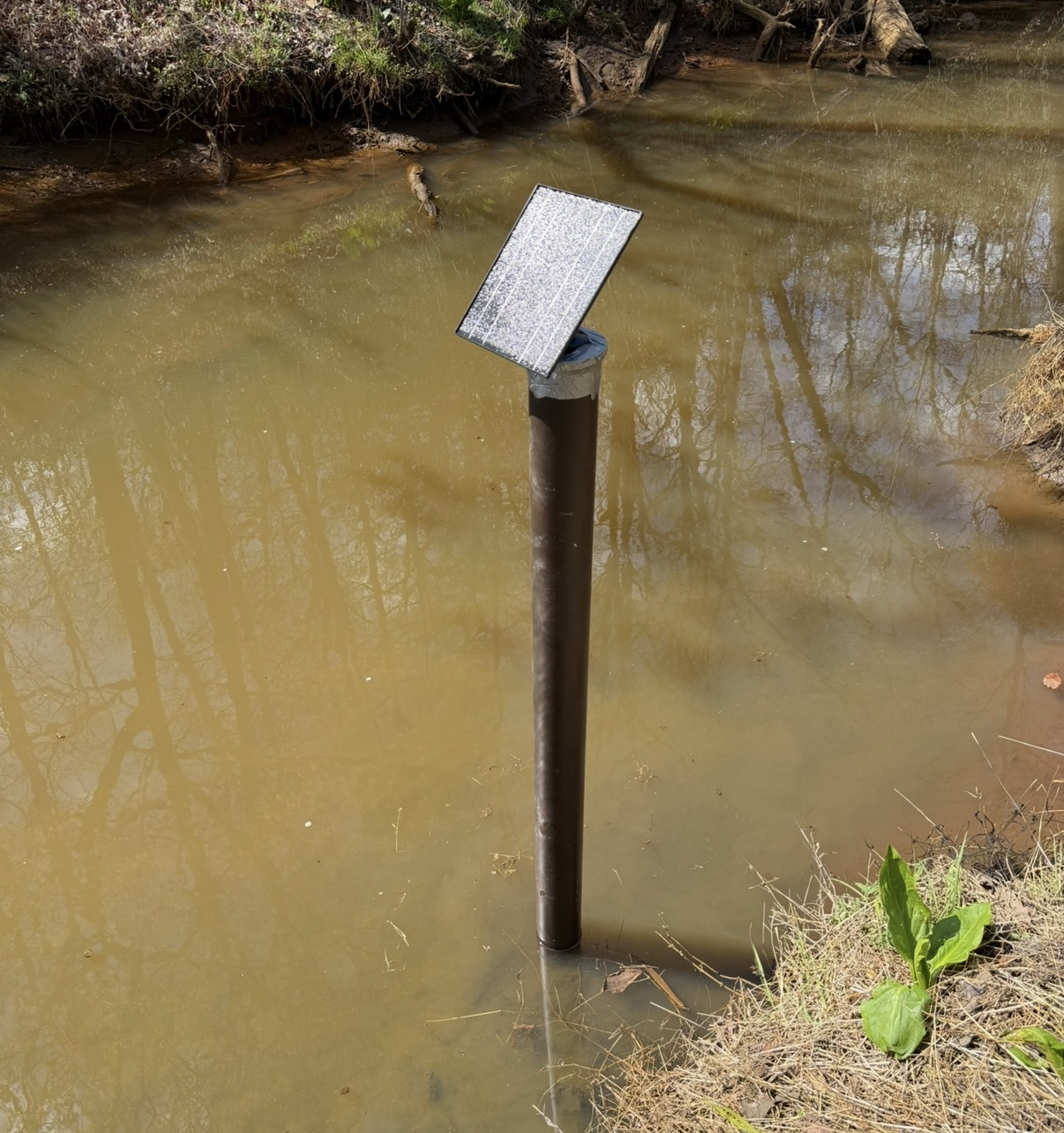
AI coding tools have been fantastically useful for working through my long backlog of vaguely planned projects that I never found the time or energy to finish. This post tells the story of how I used them to build a project that had previously felt insurmountable simply because I never had enough time.
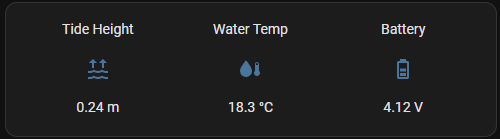
I built a self-contained, solar-powered tide gauge that reports water level, water temperature, and battery status to my Home Assistant server once a minute. It does this over a LoRa connection to The Things Network (TTN) base station in my loft.
Requirement
I live near a creek with unpredictable tides: it’s at the top of a large bay, and the water level is strongly influenced by wind direction and strength. I wanted to build a simple tide gauge that reports the current water level back to my Home Assistant server so I know when it’s suitable for paddle-boarding and kayaking. The device had to be small, cheap, and self-contained. It would be powered by a small Li-Ion battery charged from a photovoltaic panel, which meant it also had to be very low power.
Design
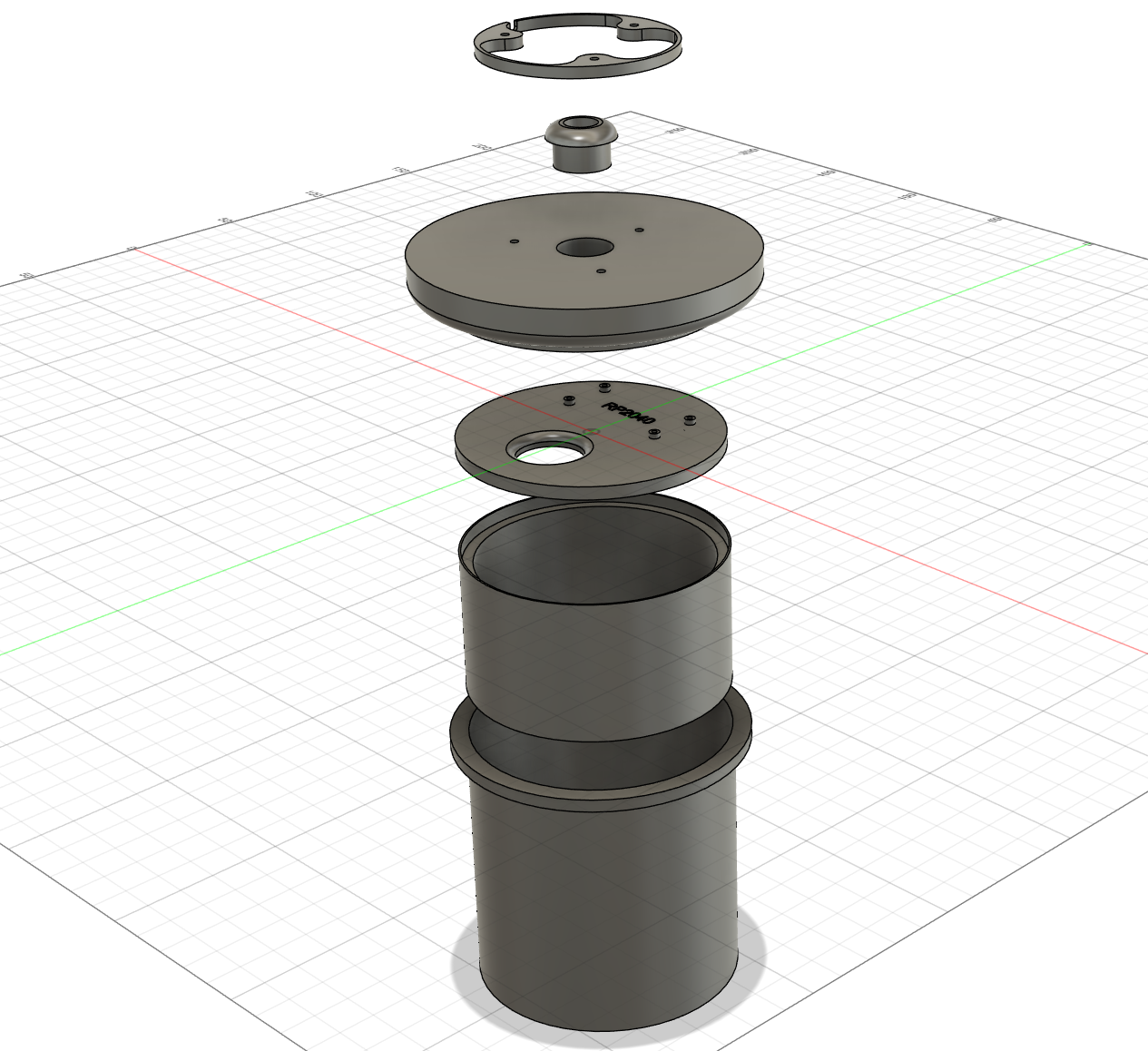
The basic design is a 4" pipe driven into the mud in the creek. It has holes drilled into it to let water in and out, and a 3D-printed “pot” at the top that contains all the electronics. On the bottom of that pot is a downward-facing ultrasonic transducer that measures the water level in the pipe. You also need to drill a small hole in the pipe below the pot to let air in and out as the water level changes.
Water level sensor
I used an ultrasonic transducer to measure the distance to the water. The standard cheap ultrasonic module that everyone uses with a Raspberry Pi is the HC-SR04. There are waterproof versions available, such as the JSN-SR04T, which are often sold as drop-in replacements for the HC-SR04 (spoiler alert: they’re not).
Water temperature
This bit was easy: plug in a DS18B20 and go. I had to extend the cable with some 3-core 22AWG wire and run the longer cable down the inside of the pipe so the probe could sit on top of the mud at the bottom. I zip-tied the cable to the side of the pipe using pairs of holes drilled near the top and bottom.
Compute
I used a RP2040 microcontroller because I’m a hopeless Raspberry Pi fanboi it’s simple and low-power. With an HC-SR04-style sensor, it looked as if getting basic distance readings on an RP2040 ought to be straightforward, so I assumed I would be able to knock up some workable code in MicroPython and then do the transport layer quite easily (another spoiler alert: I couldn’t).
Data link
The data rate is very low: a few bytes every minute or so. Wi-Fi is impractical because the device is a long way from the nearest base station, Wi-Fi is too power-hungry, and I don’t need the bandwidth anyway.
LoRa fits the bill perfectly: long range and low power. I already have a The Things Network base station in my loft, using a RAK2287, and there is a Home Assistant integration for TTN.
Adafruit sells an RP2040 with a built-in RFM95 LoRa radio, which should have made this easy (final spoiler alert: this was unexpectedly hard).
Power
The Adafruit Feather RP2040 RFM95 has a JST connector for a LiPo battery, and the appropriate circuitry to charge it from the USB port. Be careful: many of the batteries available on Amazon are wired with the wrong polarity, so you may have to get your soldering iron out and swap the leads over. I did.
There are plenty of small photovoltaic (PV) panels available on Amazon; most are marketed as suitable for powering security cameras. I first tried a 5W panel, but it didn’t provide enough power to keep the battery topped up. I then rewrote the code (well, I didn’t; see below) to reduce the RP2040’s power consumption, added a transistor to turn off the HC-SR04 between transmissions, and fitted a larger 10W PV panel. That combination works well.
Why this is perfect for AI
We choose to do these things not because they are easy, but because we thought they would be easy
- All engineers
This should not have been a particularly complex project, and yet… a whole host of annoying blockers conspired to stop the darned thing from just working. I had neither the time nor the patience to persevere long enough to fix them all myself, until AI came to the rescue. The main challenges were:
- Compatibility. That waterproof ultrasonic transducer is not a drop-in replacement for the HC-SR04, despite all the claims to the contrary. I tried several different heads and boards from different suppliers, and they all seemed to max out at 60cm, with other weird anomalies messing up the readings. I tried them on 3.3V and 5V, and even installed a buck-boost converter to clean up VCC, but nothing worked. Figuring this out was extremely frustrating, but it would have taken much longer without AI writing test scripts on demand. By contrast, the HC-SR04 proved utterly reliable when plugged straight into the RP2040’s 3.3V pin, returning accurate measurements with a standard deviation of less than a millimetre across 16 readings… until I put it in a 4" pipe (see below).
- Documentation, or the lack of it. Adafruit has some handy guides on the RP2040/RFM95 board itself, and there are solid CircuitPython LoRa libraries, but I still found myself bridging gaps to get this board talking cleanly to the current TTN stack. So I had to write my own libraries around the TTN APIs and… this is where my patience ran out. AI made this easy.
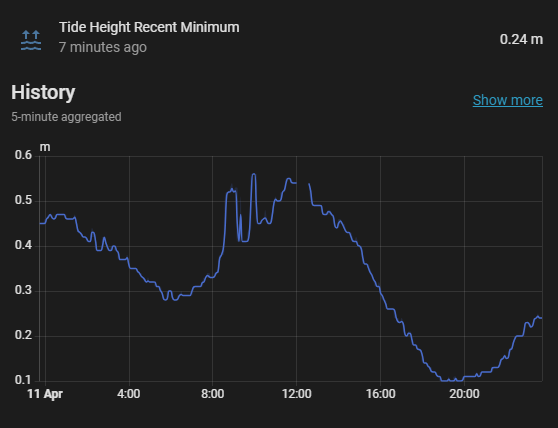
- Physics. Putting an ultrasonic transducer at the top of a tube feels like it should just work, but in practice it picks up lots of stray reflections. That would be less of a problem if these cheap modules returned all echoes, because you could just pick the longest path and dismiss the rest, but they only return the first one, which is often spurious. In my case, the electronics “can” at the top of the tube acted as a resonant chamber, and it took me ages to figure that out. AI was a great help with debugging the physics as much as the code. I ended up putting a 20g bag of silica gel on top of the transducer; the beads scatter sound in much the same way as a submarine’s anechoic tiles, and they also help keep the electronics dry. I also increased the number of samples and returned the median of the longest-range grouping. It isn’t perfect, but because the tide changes quite slowly, I can improve things further in Home Assistant by taking the minimum of the last 10 readings.
This is where AI comes in, because it’s perfect for lazy, hacky coders like me looking up API specs, building test rigs, debugging both code and physics, and delivering working code quickly.
Bill of materials
- 4" pipe, at least 8ft long. DWV if you’re feeling cheap; SCH40 if you’re feeling flush, which is ironic, because things that are flushed normally go through DWV…
- Adafruit RP2040 / RFM95 Feather-format microcontroller board with built-in
RFM95LoRa radio (you just need to solder on the included helical antenna). - HC-SR04 4-pin ultrasonic distance sensor module. I had much better results with this than with the waterproof
JSN-SR04T-style boards. - DS18B20 waterproof digital temperature probe. The cable wasn’t long enough, so I extended it with some 3-core 22AWG cable and sealed it with heat-shrink to keep it waterproof.
- 10W photovoltaic panel USB-output solar panel. The USB lead is far too long, so you’ll need to coil it up inside the “pot”.
- LiPo battery single-cell
3.7Vlithium-polymer battery with a JST lead. Check the polarity before plugging it in; I had to swap the leads on mine. - BC548
NPNtransistor to switch power to the HC-SR04 between measurements. - Resistors for a battery-voltage divider. I used
100kΩand220kΩ. - Dupont wires female-to-female jumper wires, lots of them. Some of these will need to be cut and soldered to make multi-way connectors.
- 3D-printed parts: STLs are available along with the RP2040 code on my GitHub.
- M3x16mm screws to attach the PV to the top of the assembly, and M2 screws (optional) to attach the RP2040 board to its 3D-printed base.
- Paint, if you or a family member objects to having a big white pipe banged into the mud on your waterfront. Brown paint makes it practically invisible.
Wiring
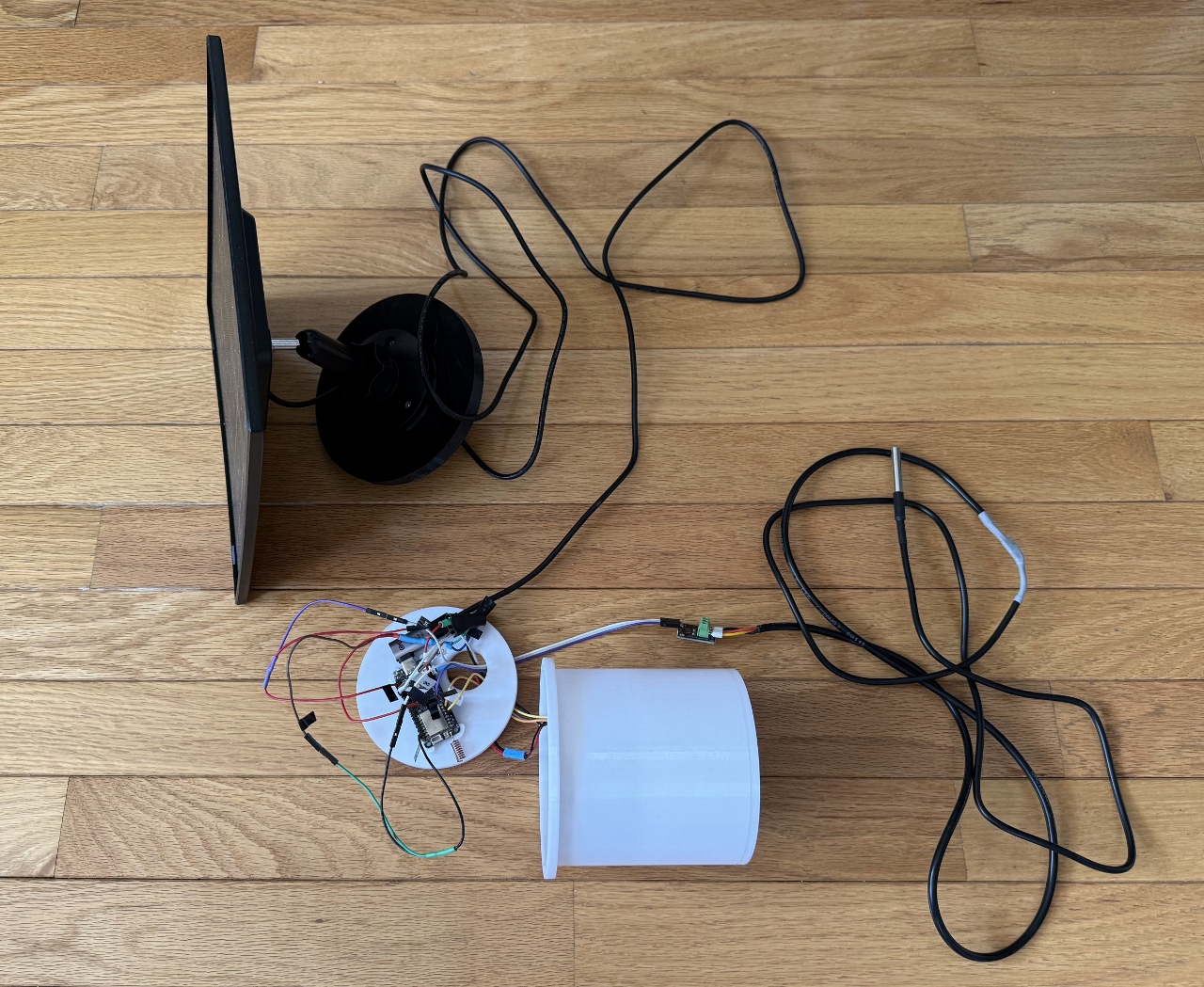
Unfortunately, at the time of writing, Codex is not very good at making wiring diagrams. I could probably fix that by telling it which open-source tools to use, but for now I’ll just list the RP2040 pinout here:
- D6 -> HC-SR04 TRIG
- D5 <- HC-SR04 ECHO
- D10 -> BC548 base through 1k resistor
- BC548 base -> GND through 10k resistor
- BC548 emitter -> GND
- BC548 collector -> HC-SR04 GND
- 3V3 -> HC-SR04 VCC
Battery measurement
- A0 / GPIO26 <- divider midpoint
- BATT -> 100k -> divider midpoint
- Divider midpoint -> 220k -> GND
Temperature sensor
- D9 <-> DS18B20 DQ
- D9 -> 3V3 through 4.7k pull-up (the Amazon link above comes with a small board that includes the resistor)
- 3V3 -> DS18B20 VDD
- GND -> DS18B20 GND
The LiPo battery plugs into the RP2040 battery connector, after you check the polarity, and the USB-C lead from the PV panel plugs into the USB-C connector on the RP2040. Its built-in circuitry handles charging. Run the USB cable through the hole in the “plug” and, once it’s all screwed down, it should be reasonably water-resistant. Coil up the excess cable inside the “pot”.
There are not enough 3V3 and GND pins on the RP2040, so you will have to solder some Dupont connectors together to make “splitters”. You can put the legs of the resistors and transistor into the Dupont connectors to save some soldering, but make sure you heat-shrink everything to prevent shorts.
I forgot to put a hole in the bottom of the 3D-printed pot for the temperature sensor wire so, until I get round to fixing that, you’ll have to drill one. Sorry!
Software
This would normally be the bit where I’d write, in excruciating detail, which commands you need to type to install the right packages, tweak the right config files, and build the image properly. But in 2026 I don’t need to do any of that, because in my case it was enough to install and run Codex CLI.
Clone my GitHub repo and run codex in the resulting directory. It will figure it all out. In fact, if you don’t know how to clone my repo, you can just ask Codex to do that too. If you’re planning on doing any further development then I recommend you also tell Codex to use beads (bd) and describe your preferred software-engineering approach (such as test-driven development) which it can save in your AGENTS.md file.
Plug your RP2040 into a USB port and Codex will tell you what to do with it.
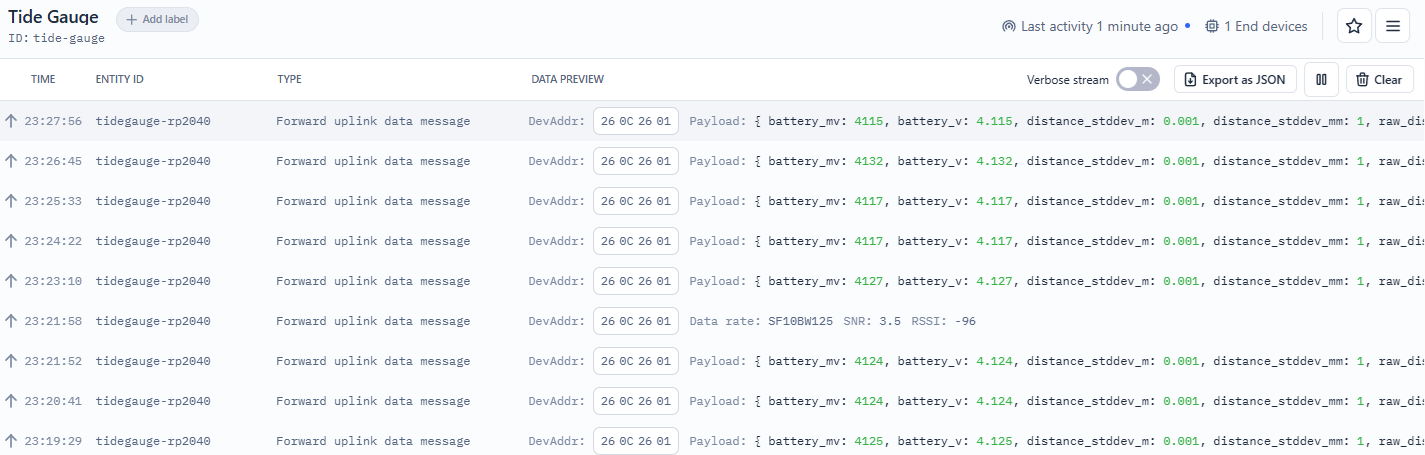
You will need to create an “Application” in your TTN dashboard and, yes, Codex can walk you through that as well. Here is the live data feed from my working tide gauge:
If you don’t have a TTN node within range, you can ask Codex, Claude, Copilot, or similar tools how to set one up on a Raspberry Pi too. You would then register it as a gateway in your TTN portal.
The Home Assistant side is quite straightforward but, if you get stuck… yup, Codex. Here’s mine in Home Assistant: still a bit noisy because of spurious reflections, but eminently usable.
These coding agents also make excellent sysadmins. I had some Cisco IP phones I wanted my kids to be able to play with, but I know nothing about PBX systems. No problem: I installed FreePBX on a fresh VM and Codex just made it all work. I’m not brave enough to use Codex on an important production system yet, but it’s excellent at finding and fixing problems on home servers. It also diagnosed a problem on my Home Assistant server: I told it “find the memory leak”, and it replied, “it’s not a memory leak; you’ve misconfigured a data source and it’s filling up your DB and causing the system to churn”. It was right, and it then fixed the misconfiguration for me.
I’m living in the future. I don’t write code any more, and I don’t debug complex system glitches any more. I administer fleets of agents that do it all for me.